LogoResLeap AI
  • Image Upscaler
  • Features
  • Pricing
  • Blog
Sign up
ResLeap V2: 8K Output, Clearer Detail, and a More Realistic Look
2026/10/02

ResLeap V2: 8K Output, Clearer Detail, and a More Realistic Look

ResLeap V2 outputs up to 8K. Upscaled portraits and materials keep clearer detail and look closer to a real photo.

ResLeap V2 is now the default model in the ResLeap AI Image Enhancer. The new algorithm outputs up to 8K (8192×8192), with clearer detail and a look closer to a real photograph.

Examples

Each comparison runs left to right: original, V1 result, V2 result.

On the portrait, V2 keeps the eyes, lashes, and skin texture clearer, and the light falls more naturally.
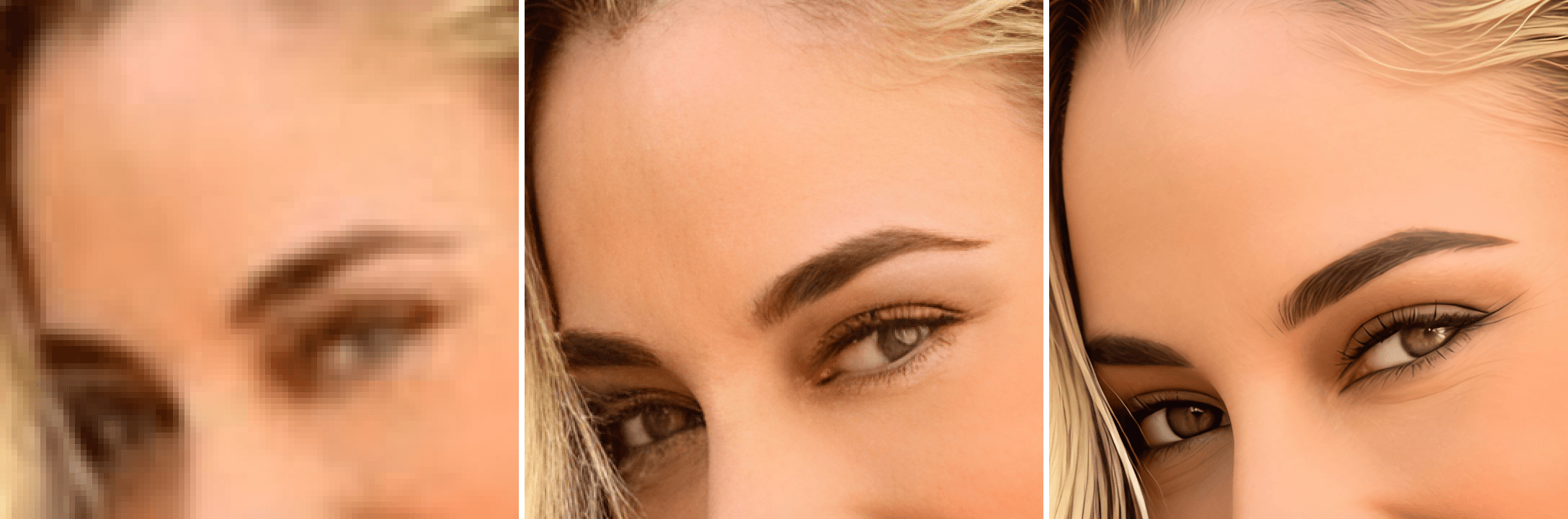
Portrait comparison: original on the left, V1 result in the middle, V2 result on the right

On the jewelry, V2 keeps the metal weave, gem edges, and highlights clearer, so the grain and reflections look closer to the real object.
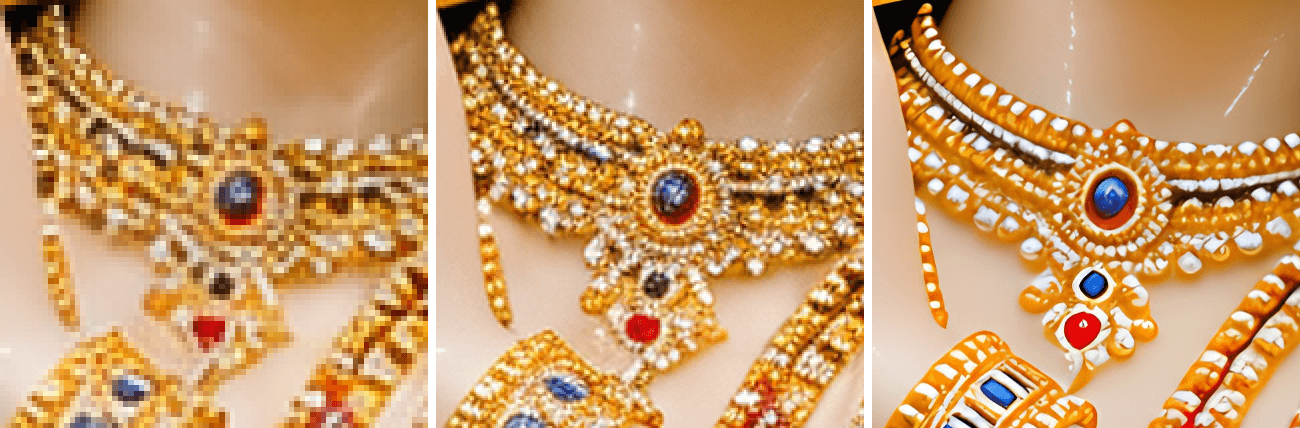
Jewelry comparison: original on the left, V1 result in the middle, V2 result on the right

What the new algorithm changes

FeatureV2
8K outputThe long edge reaches 8192 pixels. The original aspect ratio stays the same, which suits print, wallpapers, and later crops.
Clearer detailHair, fabric, metal, and edges are rebuilt as their own structures, so small photos and tight crops stay readable.
More realisticSkin keeps pores and natural transitions. Materials keep grain and highlights, closer to a real photograph.

Credit comparison

V1 costs a flat 2 credits per image. V2 is priced by the predicted output long edge: the source long edge times the scale, capped at 8192 pixels.

Predicted output long edgeV1V2
≤ 2048px2 credits4 credits
2049–4096px2 credits6 credits
4097–8192pxNot available (4K max)10 credits

Open the ResLeap AI Image Enhancer to use V2.

All Posts

Author

avatar for JayDee
JayDee

Categories

  • Product
ExamplesWhat the new algorithm changesCredit comparison

More Posts

Face Upscaler: Why Some Blurry Faces Need Face Enhancement
Product

Face Upscaler: Why Some Blurry Faces Need Face Enhancement

Regular AI upscaling can make a photo larger, but very blurry faces often need dedicated face restoration. Learn when to use ResLeap's Face Enhancement.

avatar for JayDee
JayDee
2026/06/05

Newsletter

Join the community

Subscribe to our newsletter for the latest news and updates

LogoResLeap AI

The Ultimate AI Image Upscaler & Enhancer

X (Twitter)
Product
  • Features
  • Pricing
  • FAQ
Resources
  • Blog
  • Changelog
Company
  • About
  • Contact
Legal
  • Cookie Policy
  • Privacy Policy
  • Terms of Service
Featured on Saaspa.geListed on ToolRainFeatured on LaunchVaultPowered by Startup FastFeatured on HuntifyAIListed on AIDirsListed on JustSimple ToolsFeatured on AIJustBetter.comOpenHunts Club MemberFeatured on aitoolfame.comFeatured on saasfame.comFeatured on toolfame.com
© 2026 ResLeap AI. All Rights Reserved.